
Emergency Medicine · EMS & Disaster
The Pre-Alert That Saves Minutes
Paramedics bring a woman with sudden right-sided weakness and slurred speech. The clock started earlier than the handover says. Use the pre-alert, confirm the last-known-well time, and activate the stroke pathway before she gets to the scanner.
How the case starts
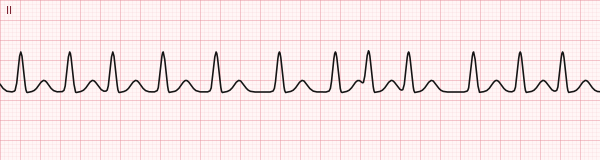
Sixty-six-year-old woman, pre-alerted from the scene as a stroke. Husband found her slumped in the kitchen at 18:40 with a right facial droop, a weak right arm and slurred speech. He says she was last seen normal at 18:10 when she went to cook, so the last-known-well time is 18:10, not 18:40. Crew performed a stroke scale and glucose (7.4), blood pressure 186 over 100, irregular pulse. Scene time nine minutes. Bypassed the nearest hospital for our stroke centre. Arrival in twelve minutes. No medication given.
What the team practises
- Use the pre-alert: team at the door, CT ready, stroke code activated before the stretcher arrives.
- Confirm and record the last-known-well time rather than the time found, and check it again with family.
- Receive a structured handover without interrupting resuscitation, and give the crew feedback.
- Explain how EMS medical oversight, dispatch, protocols and destination decisions shape stroke outcomes.
On the monitor
The case moves through this rhythm on Ruqelo Sim's live monitor as the team works.
Running it in Ruqelo Sim
- The instructor picks the case and reads the handover; the monitor and the learner's screen join with a QR code
- The patient answers questions in their own words, and a resus nurse voice reads back every order
- The case moves on as the team acts, and every action is timed for the debrief
Similar cases
Run “The Pre-Alert That Saves Minutes” with your team
Ruqelo Sim runs the monitor, the instructor's controls and the patient on three iPads, tablets or computers, all in sync. From $19 a month, cancel any time.
 Also in the browser on any iPad, tablet or computer.